Portfolio
Documenting what I learn - Labs, CTFs, etc.
Network Security and Firewall Rules
This post will revolve around hardening our network security by introducing Firewall Rules to control traffic between subnets, protect infrastructure, and limit potential attack vectors.
Our Current Network Topography

Internet (WAN)
      |
   pfSense
   /      \
LAN        USER_NET
(Infra)    (Users)
10.10.10.0/24   10.10.20.0/24

LAN:
  └─ Domain Controller (AD / DNS)

USER_NET:
  └─ Domain Users
Threat Model
Why are we implementing security measures? Well, we will assume that endpoints within USER_NET may get compromised through phishing, malware, etc.
Thus, I will set up security mitigations to address these specific points.
- Preventing lateral movement from USER_NET into infrastructure systems
- Protecting management interfaces (pfSense Web Configurator)
- Reducing exposed services to only those required for Active Directory domain operations
This allows us to enforce segmentation while also following the Principle of Least Privilege.
Disabling pfSense’s Web Configurator on USER_NET (OPTIONAL)
Currently, pfSense has an interface on USER_NET with the IP Address of 10.10.20.2, which means users can theoretically access the pfSense Web Configurator by querying the interface IP address in a browser.
Not too important since the username and password for pfSense are still needed to access the Web GUI, but I figured it would be best practice to prevent users in USER_NET from reaching the pfSense Web Configurator, reducing the exposed attack surface.
We can create a rule to either BLOCK or REJECT any traffic from USER_NET to 10.10.20.2.
A BLOCK rule causes the packet to be dropped, which indicates a timeout. A REJECT rule instantly sends an immediate refusal message. Because we are dealing with internal traffic, I will use REJECT - better for users to be instantly notified that they cannot connect to a specific destination. For anything external, we will use BLOCK as that gives out the least information to attackers.
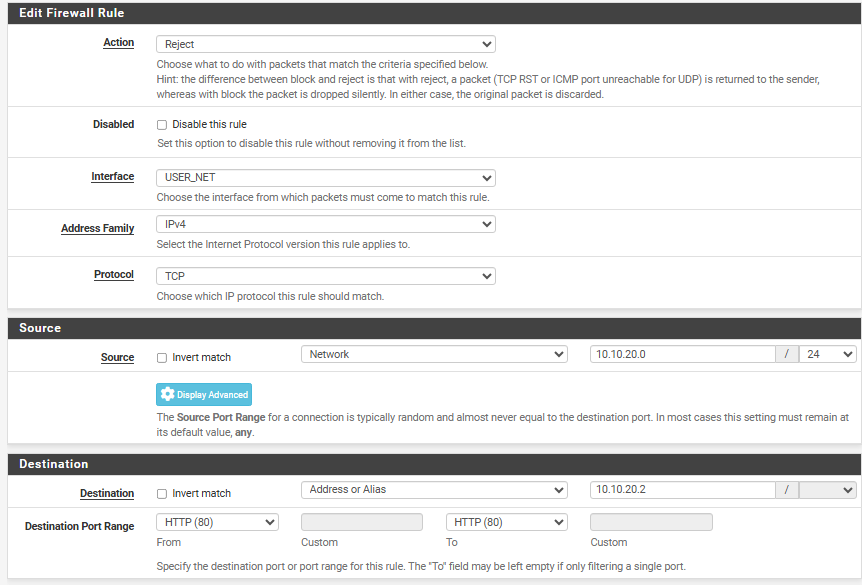
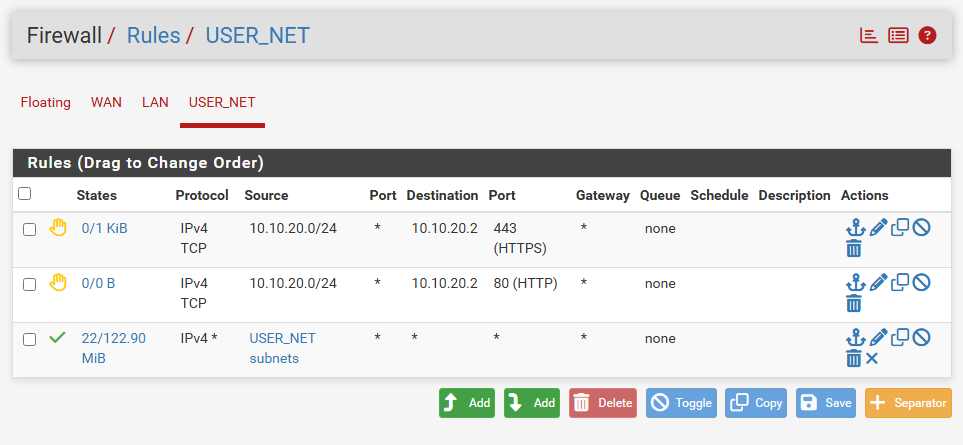
Here, I am blocking TCP (Transmission Control Protocol) traffic to ports 80 (HTTP) and 443 (HTTPS), preventing access to the Web Configurator from USER_NET.
Note: It is redundant to block port 80 and port 443, but I am doing it more as a guide since I do not know if you have the pfSense Web GUI running on HTTP or HTTPS. I personally have it running on HTTPS.
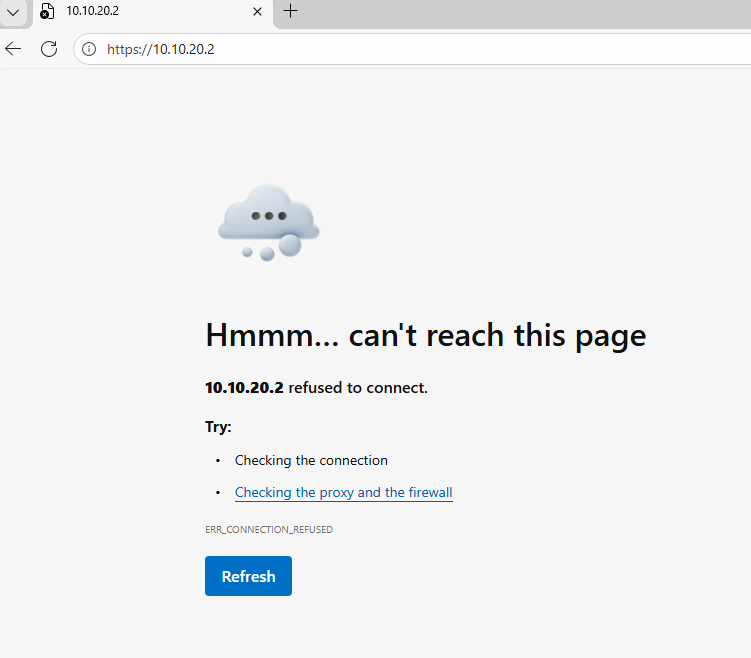
Querying for 10.10.20.2 on a user machine in 10.10.20.0/24 gives me a refused connection, web GUI can still be accessed through LAN (INFRA_NET)
Aliasing and Hardening USER_NET -> LAN (INFRA_NET)
Aliasing in pfSense provides abstraction by allowing firewall rules to reference logical objects instead of hardcoded IP addresses, networks, or ports. This improves rule readability and maintainability.
To harden traffic between USER_NET and LAN (INFRA_NET), I created two aliases, DC_SERVER and AD_REQUIRED_PORTS. The objective is to enforce the Principle of Least Privilege by restricting USER_NET access to only specific Active Directory services required for normal domain operations.

DC_SERVERreferences the IP address of the DC (Domain Controller)AD_REQUIRED_PORTScontains the set of ports required for essential AD services
| Port Range | Protocol | Service | Function |
|---|---|---|---|
| 53 | TCP/UDP | DNS | Domain Name Resolution |
| 88 | TCP/UDP | Kerberos | Authentication (TGT/TGS) |
| 123 | UDP | NTP | Time Synchronization |
| 135 | TCP | RPC Endpoint Mapper | RPC Service Coordination |
| 389 | TCP/UDP | LDAP | Directory Queries |
| 445 | TCP | SMB | SYSVOL & Group Policy Access |
| 49152–65535 | TCP | Dynamic RPC | Ephemeral RPC Communications |
With Aliasing done, we can make a set of rules to enforce the Principle of Least Privilege between USER_NET and LAN (INFRA_NET).
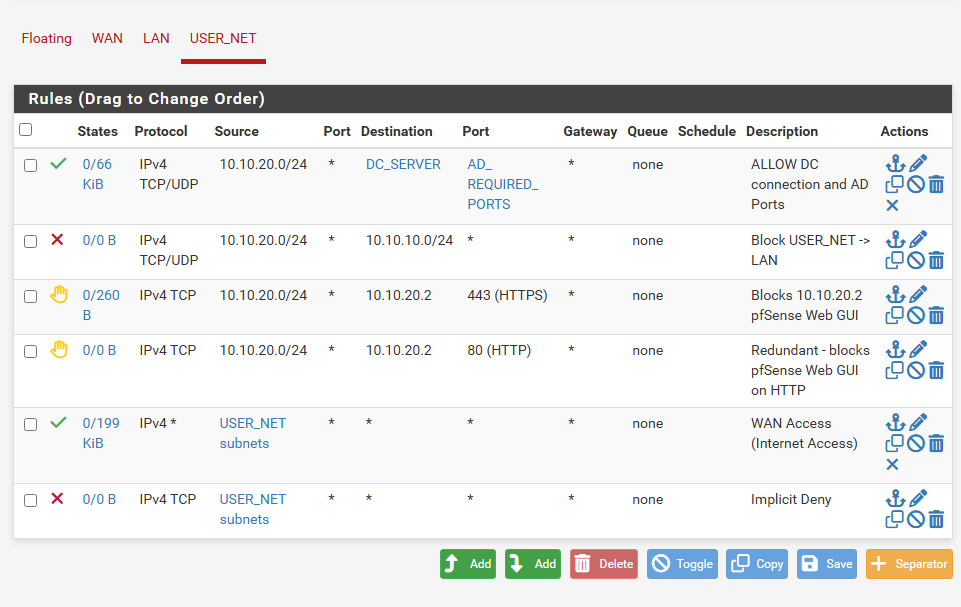
Rule order is critical - the allow rule for DC traffic must precede the deny rule to LAN, as pfSense evaluates rules top-down.
- Allow
USER_NET -> LAN (DC on AD Ports)to ensure AD functionality - Block
USER_NET -> LAN (except DC)to prevent users from interacting with infrastructure other than DC - Allow
USER_NET -> WANfor Internet Access - Restrict
USER_NETfor everything else for Implicit Denial
Securing USER_NET Internet Access
pfSense has a default WAN rule that blocks all incoming traffic. However, we do not have any rules in place for outbound traffic from USER_NET -> WAN (Internet). This means users can initiate connections to any external service on any port. This unrestricted access allows compromised devices to exfiltrate sensitive data, connect to command-and-control servers, or bypass security measures (tunneling traffic over open ports).
I have created another alias called ALLOWED_OUTBOUND_PORTS consisting of ports necessary to browse the Internet.
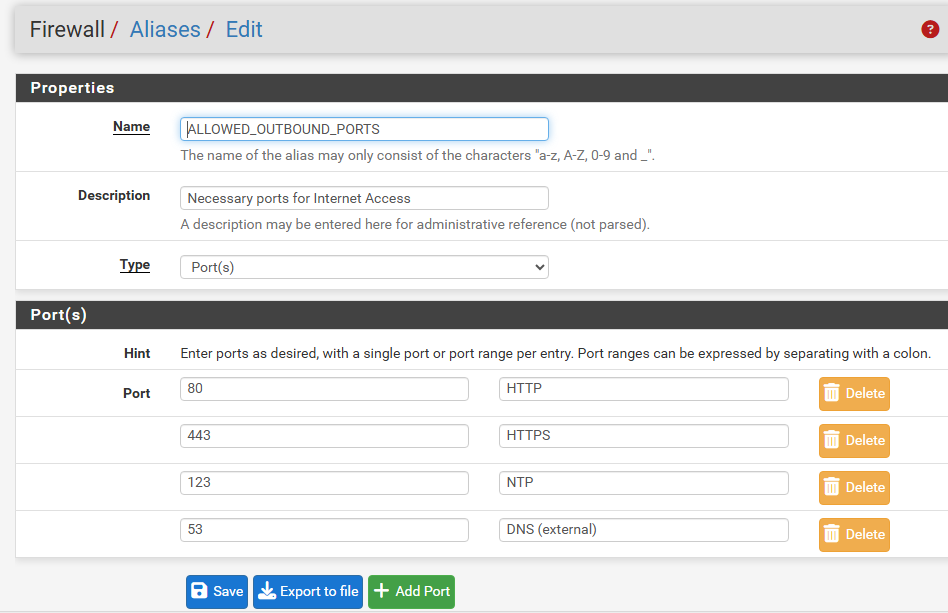
Allowing HTTP/HTTPS, DNS, and NTP
Now, I have restricted WAN (Internet) access to only allow the ports defined in ALLOWED_OUTBOUND_PORTS, permitting just the necessary services for browsing, DNS resolution, and time synchronization.
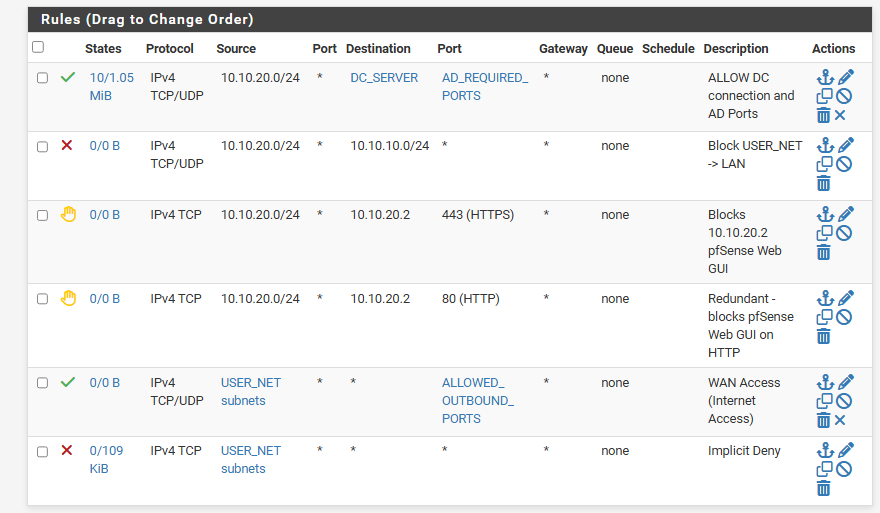
We can test our newly configured firewall rule.
Logging in as a client machine on 10.10.20.0/24, I will run PowerShell on John-PC and use the Test-NetConnection command.
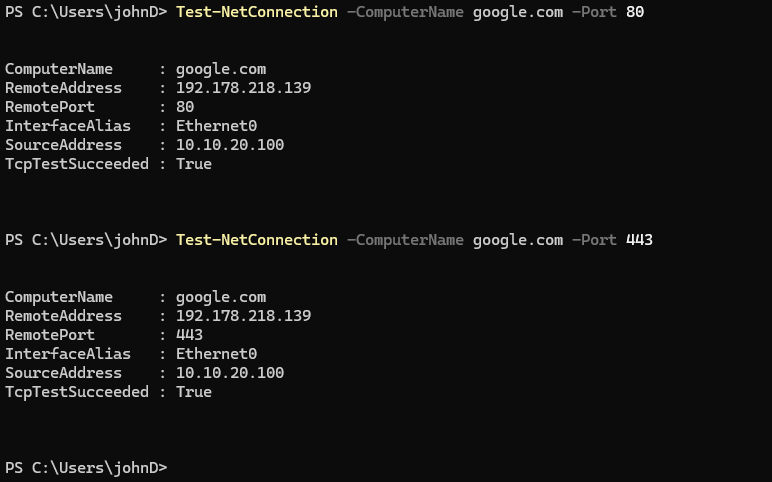
Successfully connected to Google on ports 80 (HTTP) and 443 (HTTPS), demonstrating that users can access these ports
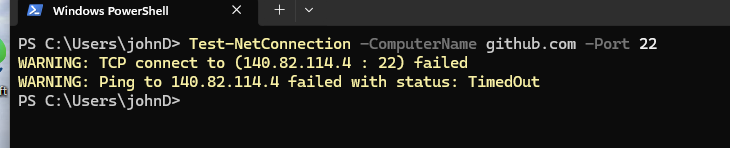
Failed to establish a connection to GitHub’s port 22 (SSH), demonstrating that outbound traffic to non-approved ports is blocked
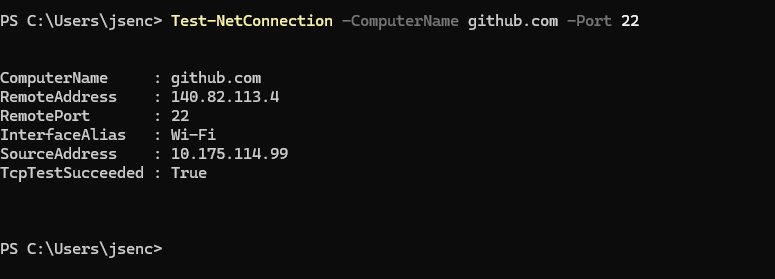
Successful connection to GitHub from my host computer (outside the VM) to demonstrate that GitHub does have an open port on 22 and is listening for SSH; this means that the previous failure was due to the firewall rather than the destination being unavailable
Summary
In this section, I have hardened our network security by implementing firewall controls in pfSense to enforce segmentation, reduce the attack surface, and limit lateral movement.
We started by assuming that endpoints in USER_NET (10.10.20.0/24) may be compromised (through phishing, malware, etc). This led me to introduce firewall rules to limit lateral movement and reduce attack vectors while maintaining domain functionality.
Key Actions:
- Restricting pfSense Web GUI on
USER_NETto reduce management-plane exposure - Creating pfSense Aliases to improve firewall rule clarity and maintainability
- Enforcing
Principle of Least Privilegeby limiting traffic fromUSER_NETtoLANto only required Active Directory ports for the Domain Controller (DC) - Limiting outbound Internet Access from
USER_NETto only essential services (DNS, HTTPS, HTTP) needed for Internet browsing to reduce exfiltration and command-and-control risk