Portfolio
Documenting what I learn - Labs, CTFs, etc.
Introduction to AD Lab
What exactly is Active Directory (AD)? Well, it is a service offered by Microsoft that allows the management and organization of resources in a network environment. Due to centralization, administrators are able to manage users, computers, groups, and security policies from a single location. This is typically done to enforce security configurations and standards across an organization.
What is needed?
- VMware (or any kind of virtualization program)
- Windows Server 2022 (evaluation ISO from Microsoft)
- Windows 11 Enterprise (PLEASE DOWNLOAD THE EVALUATION COPY, AND NOT THE HOME COPY, ISO format too)
Setting up homelab
Installation and setting up the server is pretty simple - just follow through the installation process. You might have trouble booting up initially because the SATA drives do not find your ISO file. In this case, you have to go into the VM settings, and then you have to set SATA to point to ISO and check “Connect at Power On”.
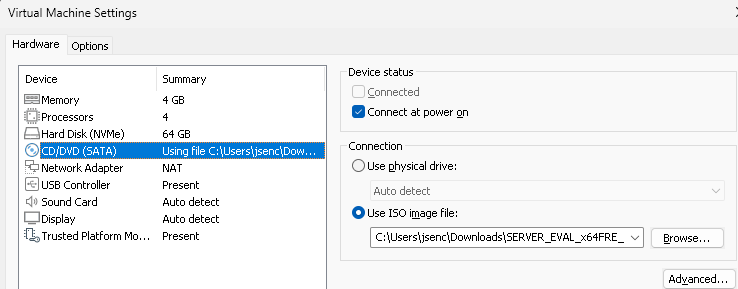
Edit VM Settings -> CD/DVD (SATA) -> Select ISO file and check Connect at Power On
Some stuff to keep in mind
You only need to download one Windows 11 Enterprise ISO file -> this file can then be used to create multiple VMs to simulate multiple users.
Evaluation copies are completely free - however, they do expire - but you can rearm them! (Use Google!)
Downloading in VM is extremely slow -> download the ISOs and then set them up in VM, if your PC has more cores -> you can always edit the VM to use more cores/memory to speed up the installation process.